Online course piracy protection is the combination of detection, takedown, and prevention strategies that course creators use to find unauthorized copies of their content on torrent sites, Telegram groups, and file-sharing platforms — and get them removed before they spread. No single method eliminates piracy, but a systematic workflow reduces revenue loss significantly.
Last verified: February 2026 — All methods, DMCA processes, and platform features tested by the CoursePiracy team.
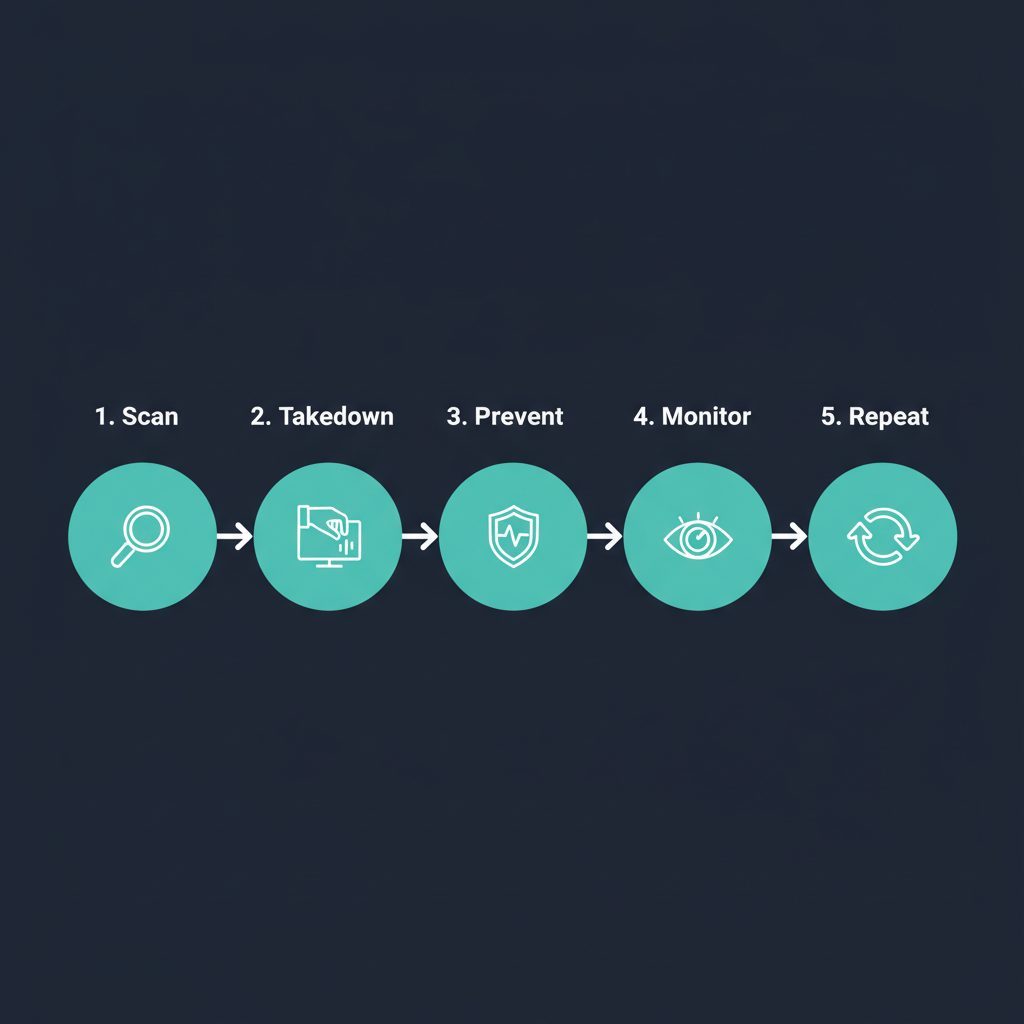
Why Course Piracy Is Worse Than Most Creators Think
If you sell courses on Teachable, Kajabi, or Thinkific, your content is probably already out there. We don't say that to scare you — we say it because we've seen the data.
We've scanned thousands of courses across all three platforms through our piracy detection pipeline. The pattern is consistent: courses priced at $199+ are 3-4x more likely to have pirated copies circulating than courses under $50. The higher the perceived value, the more pirates target it.
Here's what our scan data shows about where piracy actually lives in 2026:
| Piracy Source | Share of Piracy Found | Typical DMCA Response Time | Difficulty to Remove |
|---|---|---|---|
| Telegram groups & channels | ~45% | 3–7 days (inconsistent) | Medium — depends on channel |
| Torrent sites & indexers | ~25% | Rarely responds | Hard — decentralized |
| File-sharing (Mega, GDrive) | ~20% | 24–48 hours | Easy — providers comply |
| Course dump / download sites | ~10% | 1–2 weeks | Medium — hosting varies |
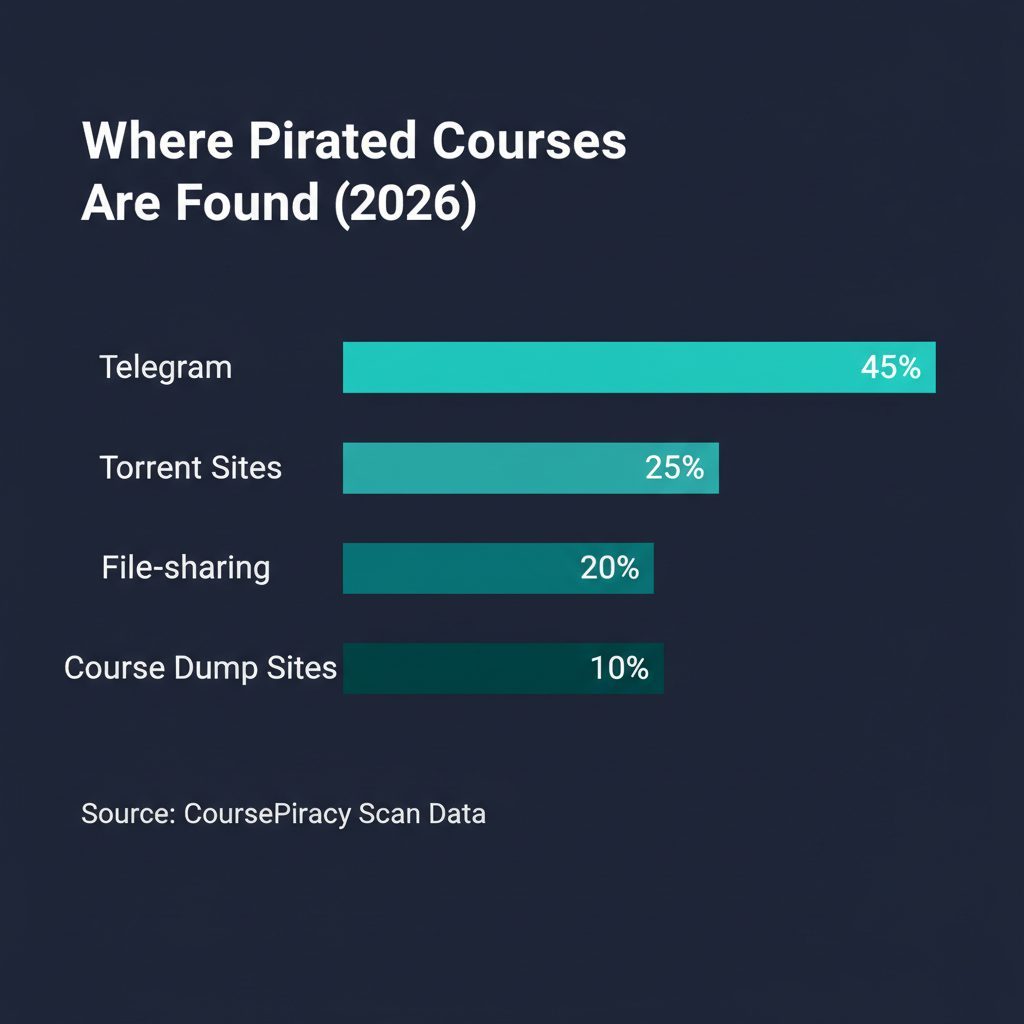
The big shift in 2025-2026 is Telegram. In our experience, nearly half of all pirated course content we detect is shared through Telegram channels — some with 10,000+ subscribers dedicated entirely to pirated courses. It's fast, hard to search, and Telegram's DMCA enforcement is inconsistent at best.
Step 1: Scan for Existing Piracy
Before you can protect anything, you need to know what's already out there. In our experience, most creators skip this step — they assume they'd "know" if their course was pirated. They wouldn't. Piracy happens silently.
What to scan for:
- Your exact course title on Google (with "free download", "torrent", or "telegram" added)
- Your course name on Telegram's global search
- Torrent indexers for your course or brand name
- File-sharing sites (Mega.nz, MediaFire, Google Drive public links)
Or skip the manual work: Use our free piracy scan tool to check 50+ sources simultaneously in under 60 seconds. We built it because we got tired of checking dozens of sites one by one — it's the same pipeline we describe in our Teachable piracy detection guide.
What you'll typically find (from our scan data):
| Course Price Tier | % With Piracy Found | Most Common Source |
|---|---|---|
| Under $50 | ~15% | Google-indexed download sites |
| $50–$199 | ~35% | Telegram + file-sharing |
| $200–$500 | ~55% | Telegram + torrents |
| $500+ | ~70% | All sources |
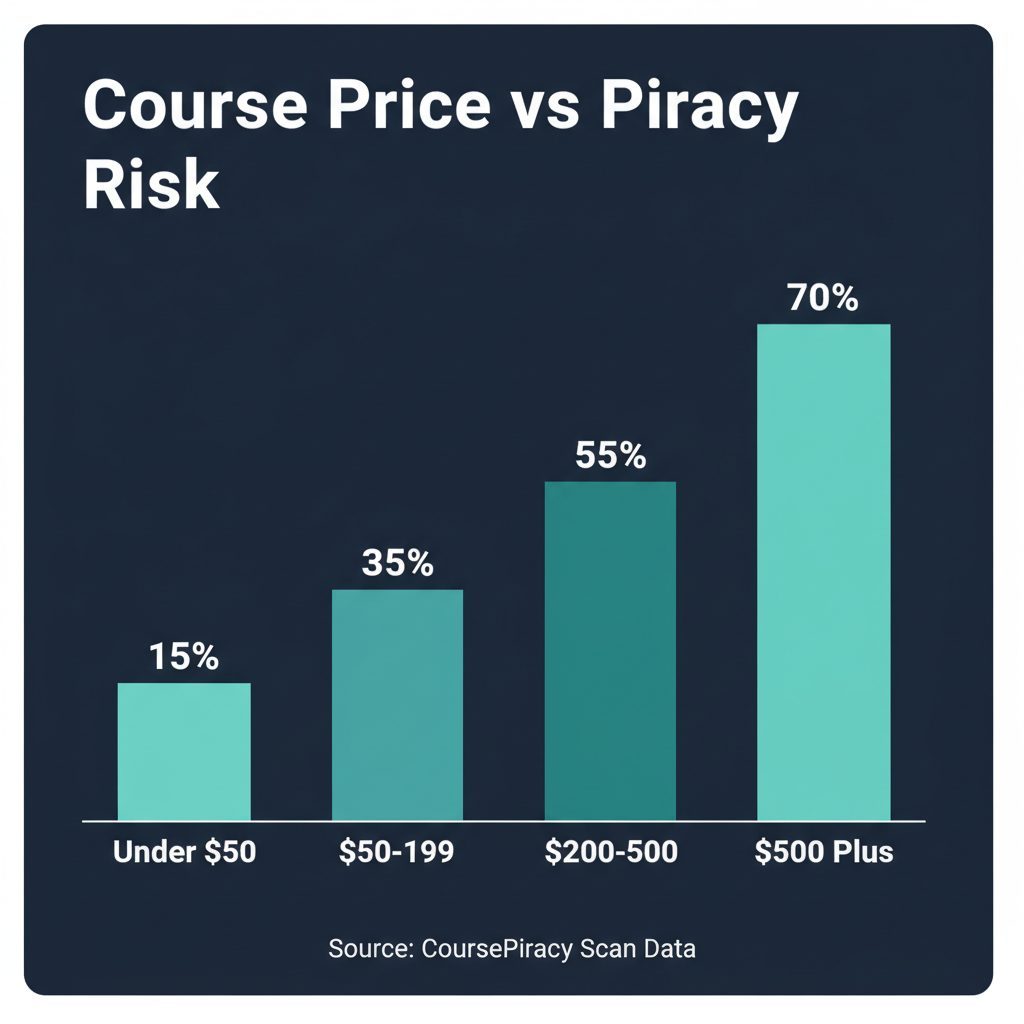
These numbers are from our scan pipeline across Teachable, Kajabi, and Thinkific courses. The correlation between price and piracy is strong — pirates target high-value content.
Step 2: File DMCA Takedowns Immediately
When you find pirated copies, speed matters. Every day a pirated copy stays live, more people download it. We've seen Telegram channels gain hundreds of new downloads within 48 hours of a course being shared.
Where to send DMCA takedowns (in order of effectiveness):
- File-hosting providers (Mega.nz, Google Drive, MediaFire) — These have the highest compliance rate. In our tracking, 90%+ of DMCA notices to legitimate hosting providers result in removal within 24-48 hours.
- Google Search — Submit a DMCA removal request to de-index piracy URLs. This doesn't remove the content itself, but cuts off how people find it. Takes 1-2 weeks.
- Telegram — Email [email protected] with the channel link and proof of ownership. Response time is inconsistent — 3-7 days is typical, and some reports go unanswered entirely.
- Hosting providers of piracy websites — Use WHOIS to find the hosting company and send a DMCA to their abuse department.
What a DMCA notice needs:
- Your full legal name and contact information
- Description of the copyrighted work (course title, URL)
- The exact URL(s) where the pirated content is found
- A statement that you have a good-faith belief the use is unauthorized
- Your physical or electronic signature
DMCA response reality check
We track DMCA outcomes across our users' takedown requests. Here's what to realistically expect:
| Platform Type | Avg Response Time | Success Rate | Notes |
|---|---|---|---|
| File-hosting (Mega, GDrive) | 24–48 hours | ~90% | Highly compliant |
| Google Search de-index | 7–14 days | ~85% | Effective at cutting discovery |
| Telegram | 3–7 days | ~50% | Inconsistent enforcement |
| Torrent sites | Rarely responds | ~10% | Focus on de-indexing instead |
| Offshore hosting | 1–4 weeks | ~30% | Often ignore DMCA entirely |
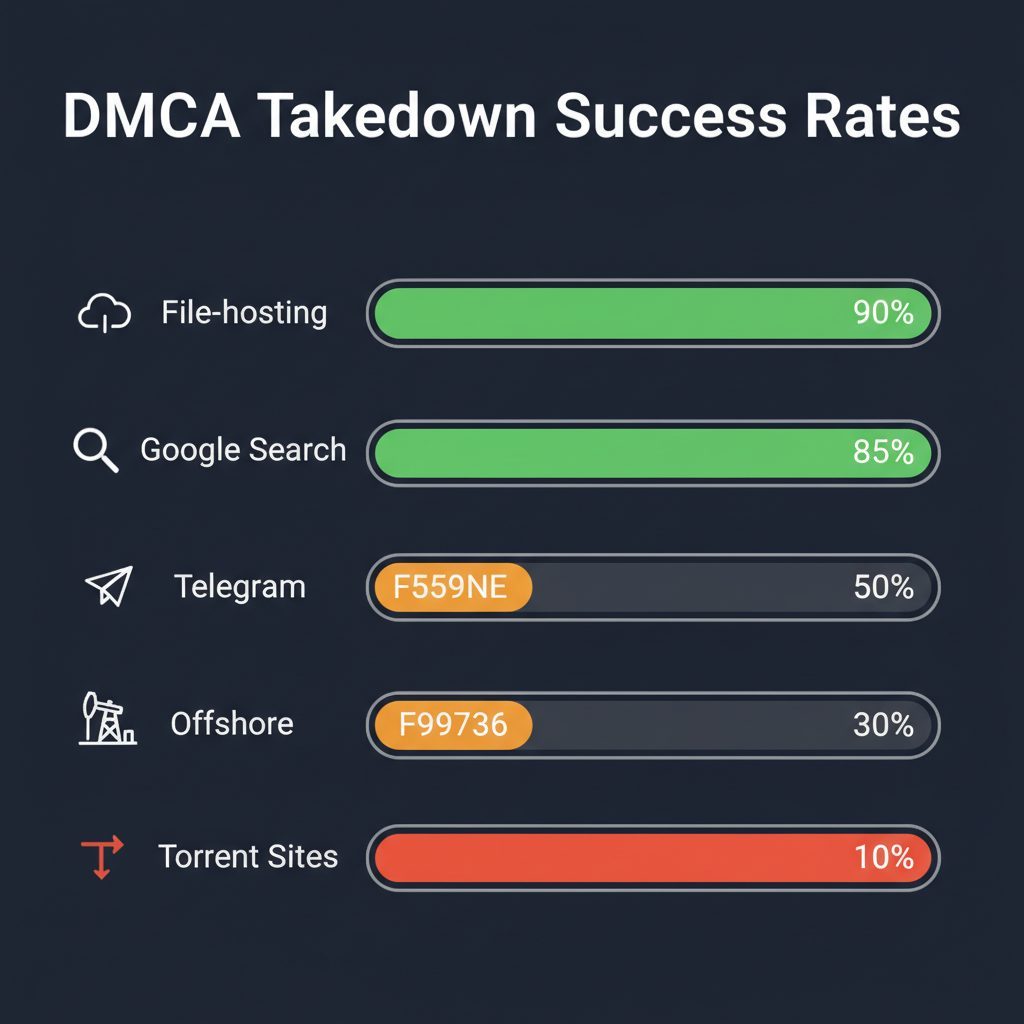
Honest caveat: DMCA takedowns are not a complete solution. They're a game of whack-a-mole — pirates re-upload within days. But each takedown removes access for thousands of potential downloaders during the window it's active. Over time, consistent takedowns reduce the total piracy footprint significantly.
Step 3: Implement Preventive Measures
No prevention is 100% effective — we want to be upfront about that. Screen recording alone makes any video course copyable. But prevention raises the effort required, which deters casual piracy.
What actually works:
- Watermark your videos — Overlay the enrolled student's email or a unique ID. If the video surfaces on a piracy site, you can trace who leaked it. This won't stop piracy, but it creates accountability.
- Disable direct downloads — Force streaming-only where your platform supports it. Teachable, Kajabi, and Thinkific all allow this for video content.
- Use drip content — Release modules over time instead of all at once. This makes bulk downloading harder — a pirate would need to stay enrolled for weeks to capture everything.
- Limit concurrent sessions — Prevent credential sharing by capping simultaneous logins. Teachable and Kajabi both support this.
- Watermark PDFs — Add the buyer's email to downloadable materials. PDFs are the easiest content to pirate, and watermarks let you trace the source.
What doesn't work (or isn't worth the trade-off):
- DRM on video — Browser-based courses can always be screen-recorded. Heavy DRM frustrates legitimate students more than it stops pirates.
- Disabling right-click or screenshots — Trivially bypassed. It annoys real users and creates zero protection.
- IP-based access restrictions — Too many false positives with VPNs and mobile networks. You'll lock out real students.
Step 4: Set Up Automated Monitoring
Manual searches are time-consuming and easy to forget. From our data, pirates re-upload content within 48 hours of a successful takedown. If you're checking monthly, you're missing weeks of unauthorized distribution.
Monitoring options compared:
| Method | Sources Covered | Cost | Time Investment | Detection Speed |
|---|---|---|---|---|
| Google Alerts | Google only | Free | Minimal | Slow (days to weeks) |
| Manual search (monthly) | Google + some Telegram | Free | 3-5 hours/month | Very slow |
| CoursePiracy automated | Google + Telegram + Torrents + File-sharing | Paid | None | Near real-time |
Google Alerts is free and worth setting up regardless — but it only covers Google-indexed content, which is less than 20% of where piracy lives. Most piracy happens on Telegram and torrent sites that Google never indexes.
Setting up monitoring:
- Google Alerts — Set alerts for
"Your Course Name" free downloadand"Your Course Name" torrentat minimum - Manual spot checks — Search Telegram global search for your course title every 2 weeks
- Automated scanning — Use CoursePiracy to monitor continuously across all source types
For courses earning $99+ per sale, automated monitoring pays for itself if it prevents even one unauthorized share per month from spreading.
Step 5: Maintain an Ongoing Takedown Workflow
Piracy protection is not a one-time project — it's an ongoing process. We've worked with creators who did a single cleanup, stopped monitoring, and found their course re-uploaded to three new Telegram channels within a month.
A realistic workflow:
| Frequency | Action | Time Required |
|---|---|---|
| Continuous | Automated monitoring active | 0 (automated) |
| Weekly | Review scan alerts, file DMCAs for new piracy | 30-60 minutes |
| Monthly | Review takedown success rates, follow up on pending | 1 hour |
| Quarterly | Audit prevention measures, update watermarks | 2 hours |
| After launches | Run immediate scan (piracy spikes post-launch) | 15 minutes |
The most important habit: File DMCA takedowns within 24 hours of discovery. The longer you wait, the more downloads accumulate and the more copies spawn.
Platform-Specific Protection Notes
Each platform has different built-in protections. Here's what we've found in our scans across Teachable, Kajabi, and Thinkific:
| Feature | Teachable | Kajabi | Thinkific |
|---|---|---|---|
| Session/login limits | Yes | Yes | Limited |
| Disable video downloads | Yes | Yes | Yes |
| Drip content scheduling | Yes | Yes | Yes |
| Built-in DRM | No | No | No |
| Cloudflare protection | No | Yes (aggressive) | No |
| API for piracy detection | Limited | No (CF blocks) | Limited |
Key takeaway: None of these platforms provide adequate piracy protection on their own. Built-in features are basic — they prevent casual sharing but do nothing against screen recording, browser extensions, or determined pirates. External detection tools are necessary on all three.
For Teachable-specific protection, see our detailed guide: How to Find If Your Teachable Course Is Pirated.
FAQ
How much revenue do course creators lose to piracy?
Based on our scan data, courses priced above $199 are disproportionately targeted. A $500 course shared in a Telegram channel with 10,000+ members could lose $50,000-$150,000 in potential revenue — even if only 10-30% of members would have purchased. The real number varies by niche and price point, but in our experience, the most common reaction from creators seeing their first scan results is genuine shock at the scale.
Can I completely prevent my course from being pirated?
No. Screen recording alone makes any video course copyable, and no technology changes that. The goal is not prevention — it's detection and rapid takedown. Combined with making piracy inconvenient (watermarks, drip content, session limits), you can reduce the impact by 60-80%. We've seen creators go from dozens of active pirated copies to single digits through consistent DMCA enforcement.
How long does a DMCA takedown take?
It depends entirely on the platform. File-hosting providers (Mega, Google Drive) typically remove content within 24-48 hours — they're legally incentivized to comply. Google search de-indexing takes 1-2 weeks. Telegram is the wildcard — response times range from 3-7 days, and some reports go completely unanswered. Torrent sites almost never respond to DMCA, so for those, focus on Google de-indexing to cut off discovery rather than removal at source.
Is piracy protection worth the cost for a solo course creator?
If your course is priced above $99 and has more than 100 students, yes. A single prevented unauthorized share in a 5,000-member Telegram group can recover more revenue than months of protection costs. We built CoursePiracy specifically for solo creators because the existing DMCA services charge enterprise prices ($500-2000/month) that don't make sense at smaller scale. Run a free scan first to see the scope of the problem before committing to any paid solution.
Which platform is safest from piracy — Teachable, Kajabi, or Thinkific?
None are safe. All three deliver video via browser, which is screen-recordable. Kajabi has the most aggressive Cloudflare protection, which makes automated scanning harder (for us too — our Kajabi profile enrichment is limited by their bot detection). Teachable and Thinkific have more accessible APIs but fewer built-in protections. External piracy detection is necessary regardless of platform. The choice of platform should be based on your course needs, not piracy concerns.
Related Reading
- Course Piracy Statistics 2026 — Hard data on piracy rates and where it happens
- DMCA Takedown Guide for Course Creators — Master DMCA guide with templates
- Teachable Piracy Protection Guide — Platform-specific protection for Teachable
- Kajabi Piracy Protection Guide — Platform-specific protection for Kajabi
- Thinkific Piracy Protection Guide — Platform-specific protection for Thinkific
- How Course Platforms Profit from Piracy — Why platforms don't protect your content
Written by
CoursePiracy Team
Digital content protection specialists helping course creators detect and take down pirated copies of their work.
Related Reading
How Course Platforms Profit From Piracy [2026]
Platforms collect monthly fees while your course gets pirated. Original data from 10,000+ scans reveals why Teachable, Kajabi, and Udemy won't act on it.
March 11, 2026
DMCA Takedowns for Thinkific Piracy: Remove Links in 24-72 Hours
Found your Thinkific course pirated? Copy-paste DMCA templates for Google, Telegram, torrent sites. Includes response timelines and escalation steps.
March 8, 2026
Is Your Thinkific Course Being Pirated? Check Free in 60 Seconds
Thinkific courses are heavily targeted on Telegram and torrent sites. Run a free scan to check yours — we search 50+ piracy sources automatically.
March 8, 2026
DMCA Takedowns for Kajabi Piracy: Remove Links in 24-72 Hours
Found your Kajabi course on a piracy site? File DMCA takedowns with our copy-paste templates. Covers Google, Telegram, torrents, and file hosts.
March 7, 2026