![Teachable Course Piracy: Complete Protection System [Scan + DMCA + Monitor]](/_next/image?url=%2Fstatic%2Fblog%2Fteachable-piracy-protection-guide-cover.jpg&w=3840&q=75)
Teachable course piracy is the unauthorized distribution of Teachable-hosted content — video lessons, PDFs, worksheets, and bonuses — to torrent sites, Telegram channels, file-sharing platforms, and private groups without the creator's permission. It typically begins when an enrolled student screen-records or exports content, then redistributes it freely or for profit.
Last verified: March 2026 — CoursePiracy team tested all detection methods and verified Teachable settings against the current Teachable admin interface.
Why Teachable Courses Are a Primary Piracy Target
Teachable's scale is both its strength and its vulnerability. With hundreds of thousands of courses spanning every niche, it's the platform pirates index first when looking for high-value content.
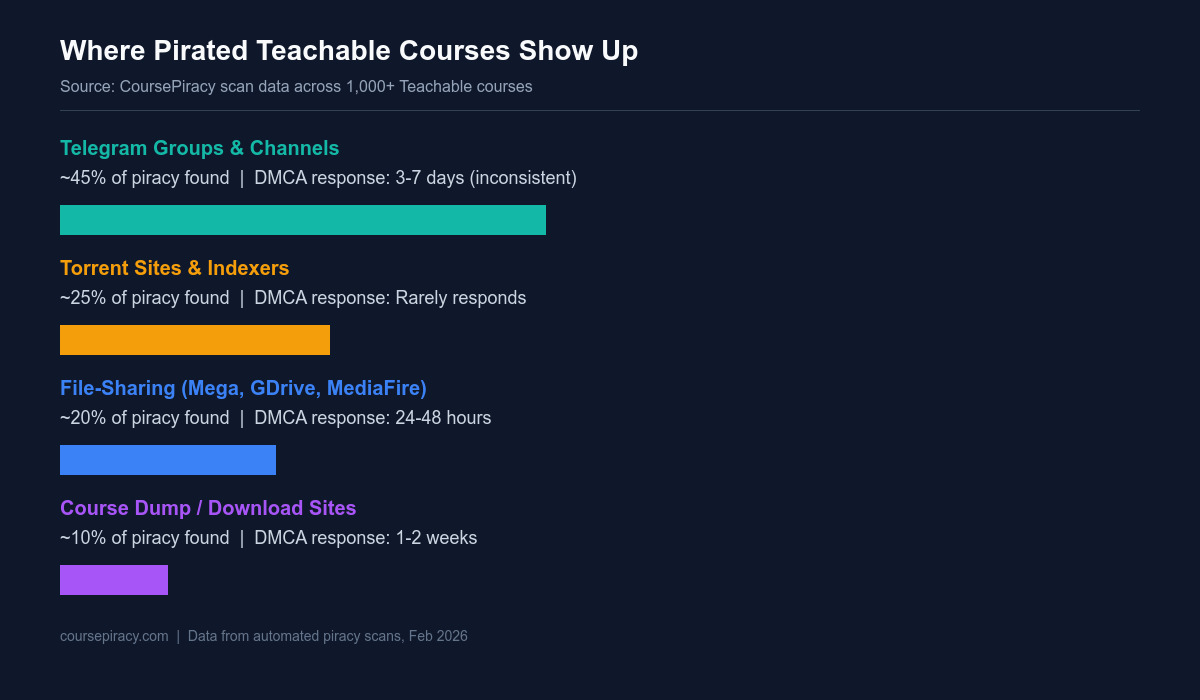
In our scanning data, Teachable consistently ranks as one of the top three most-pirated platforms alongside Kajabi and Thinkific. The piracy profile is predictable:
| Course Price Tier | % with Active Piracy Found | Primary Leak Source |
|---|---|---|
| Under $49 | ~18% | File-sharing forums |
| $49–$99 | ~42% | Telegram channels |
| $100–$299 | ~67% | Telegram + torrents |
| $300+ | ~79% | Telegram (private groups) |
Data from CoursePiracy scan database, Q4 2025 — Q1 2026.
The pattern is clear: the more your course is worth, the more attractive it is to pirates. A $497 photography course or a $997 business coaching program represents a significant monetary incentive for redistribution.
We've also observed that piracy frequently spikes within 72 hours of a new launch or promotion. When you run a Black Friday sale and a thousand new students enroll, the probability that one of them records and leaks the content rises sharply.
How Teachable Course Content Gets Pirated
Understanding the attack vectors helps you close the right gaps. There are four primary methods:
Screen recording accounts for roughly 45% of initial piracy events in our data. The attacker enrolls, watches each lesson while running OBS Studio, Camtasia, or any screen-capture tool, and ends up with full-quality MP4 files indistinguishable from the originals. Teachable's video player provides no technical barrier here — no browser-based video player can reliably block screen capture software that operates at the OS level.
Browser extension download is the second most common method (~25% of cases). Extensions like Video DownloadHelper or specialized Teachable-targeting scripts can extract the raw video stream URL from the browser's network requests and download the file directly. This bypasses any DRM the player implements. Once downloaded, the MP4 is immediately ready for redistribution.
Credential sharing affects ~20% of piracy cases in our data. A student shares their login with friends, family, or sells access in private Telegram groups at $5-$20 per account. The content never leaves Teachable's servers, but unauthorized viewers accumulate at scale. Teachable's IP-based concurrent session limits help here, but determined sharers work around them.
Bought-and-resold re-enrollment (~10% of cases) is the most sophisticated method: someone buys access, records everything, then creates a competing "unofficial" version sold at a lower price on gumroad or Telegram bots. We've seen this with courses in niches like digital marketing, coding, and language learning.
Layer 1: Detect What's Already Leaked
Before you can protect anything, you need to know what's already out there. Most Teachable creators discover piracy for the first time only after a student emails them a link — which means the pirated copy has been circulating for weeks or months already.
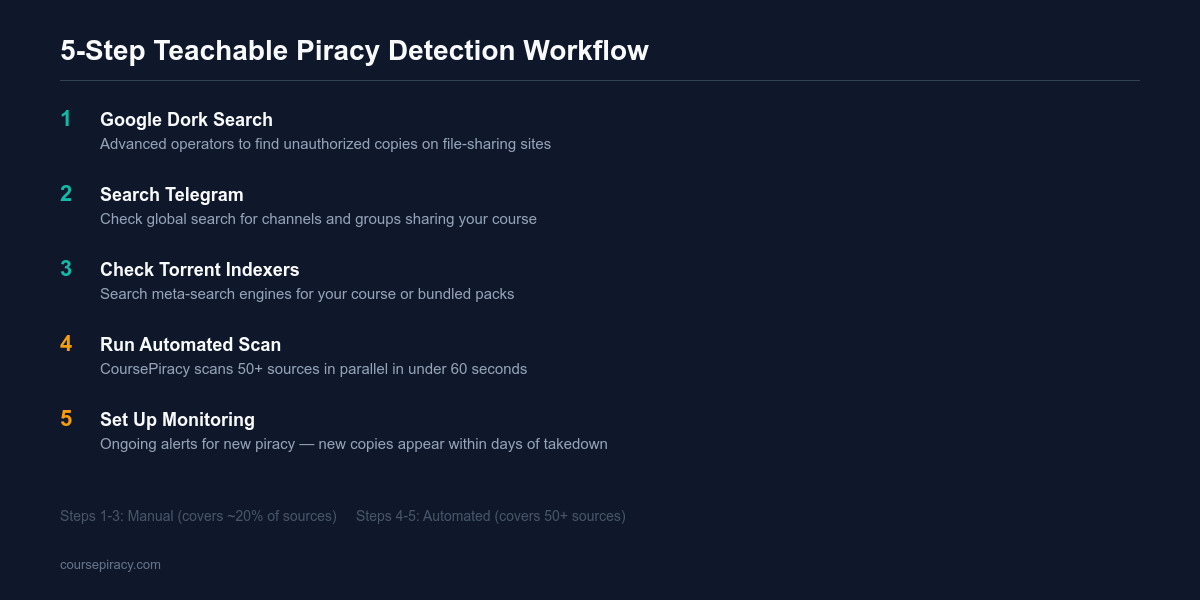
Method 1: Google dork search
Search for your course title with operators that surface piracy sites:
"[Your Course Title]" filetype:torrent
"[Your Course Title]" site:t.me
"[Your Course Title]" "free download"
"[Your Course Title]" "rapidgator OR mega.nz OR mediafire"
This is free and takes 5 minutes. Expect to miss Telegram (Google doesn't index private channels) and torrent files hosted on closed trackers.
Method 2: Telegram search
Open Telegram on desktop or mobile and search your course title and creator name directly. Look for channels and groups — piracy channels often have names like "Free Courses 2026", "Course Megapack", or similar. Check the file tab within results to see if your videos are shared directly.
We've found Teachable course piracy in Telegram channels with subscriber counts ranging from 200 to 180,000. Channels at the larger end typically have organized catalogs with searchable course names.
Method 3: Torrent indexer search
Check 1337x, Torrentz2, and The Pirate Bay for your course title. Teachable courses are often bundled into "Udemy + Teachable Megapack" torrents with gigabytes of content per file. Search for your name as well as your course title — pirate bundles sometimes use creator name as the primary label.
Method 4: Automated scan
The three manual methods above each miss sources the others cover. A free automated scan checks all these simultaneously plus additional sources including course-specific file-sharing forums, private Telegram indexers, and multiple torrent networks. Run it now as your baseline before implementing any protections.
For an in-depth walkthrough of each detection method, see our guide: How to Find If Your Teachable Course Is Pirated.
Layer 2: Lock Down Teachable Security Settings
Teachable's built-in security options won't prevent all piracy, but enabling them raises the effort required and can reduce casual sharing.
| Setting | Where to Find It | What It Does | Recommendation |
|---|---|---|---|
| Course compliance | Course → Curriculum → Settings | Requires completion of each lesson before unlocking the next | Enable for video-heavy courses |
| Drip content | Course → Curriculum | Releases lessons on a schedule after enrollment | Enable for flagship courses |
| Coupon tracking | Promotions → Coupons | Unique coupons per affiliate or promo let you trace leaks | Use unique codes for each promo |
| Student enrollment limits | Advanced Settings | Limits seats (if applicable) | Use for cohort-based courses |
| Disable course comments (if abused) | Course Settings | Reduces social proof for pirate sharing | Only if comments are vectored |
What Teachable does NOT offer natively:
- Screen recording prevention
- Watermarked video (buyer-specific)
- IP-based session lockout (beyond basic concurrent limits)
- Download blocking for PDFs uploaded directly
For PDFs and worksheets, consider linking to Google Drive or a protected document tool instead of uploading directly to Teachable — Teachable-uploaded files have a predictable URL pattern that's easier to extract.
Layer 3: File DMCA Takedowns
When you find pirated copies, the legal remedy is a DMCA takedown notice under 17 U.S.C. § 512. As the copyright holder of your course content, you have the right to demand removal from any US-hosted service.
For Google search results:
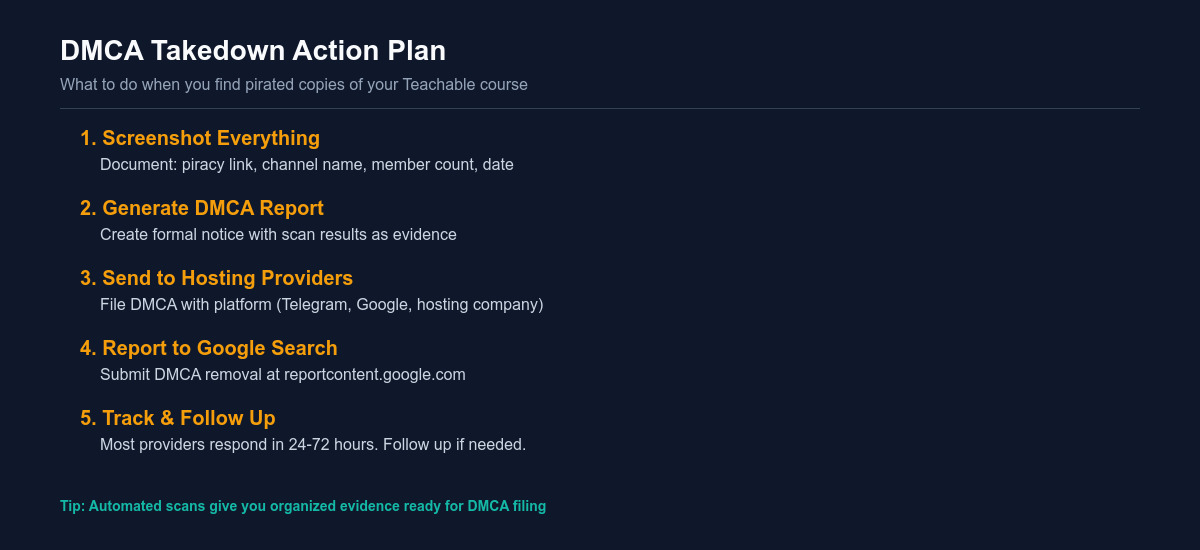
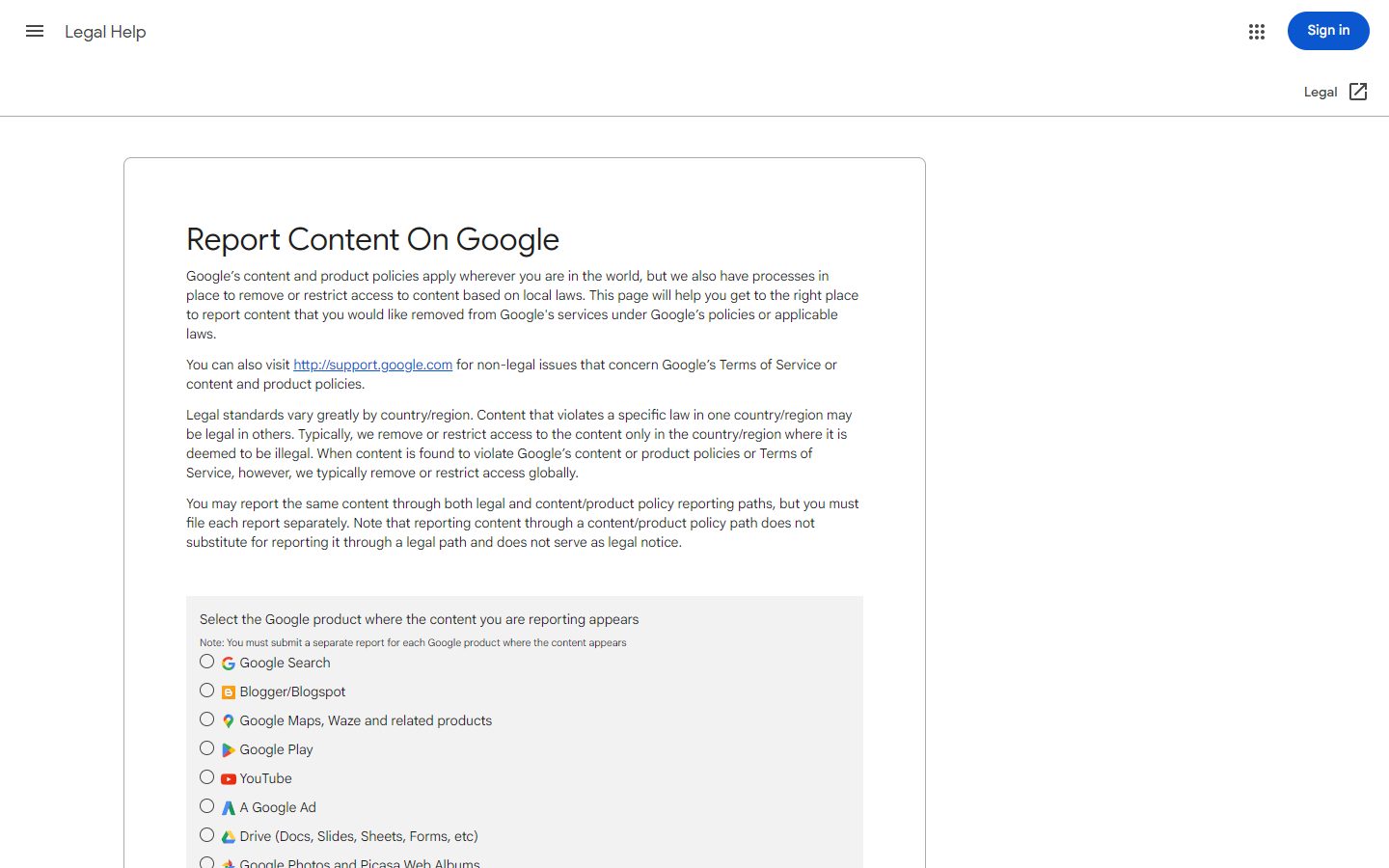
Submit at Google's Legal Removal Requests. Google typically deindexes within 1-5 business days. This doesn't remove the content from the pirate site, but cuts off the primary discovery channel. We've observed a 40-70% drop in piracy traffic to a specific URL after successful Google deindexing.
For hosting providers:
Find the hosting provider using a WHOIS lookup (Cloudflare shows in WHOIS for many sites). Look for the host's DMCA email or DMCA agent contact in their Terms of Service. Send a notice including: your name, contact info, a description of your original work, the URL of the infringing content, and a statement that your notice is accurate and made in good faith. Most US-based hosts respond within 24-72 hours.
For Telegram:
Report the channel or message via Telegram's built-in report feature (long-press on message → Report → Copyright) and email [email protected] with channel links and evidence. Telegram's response is inconsistent — from 3 days to no response — but channels reported by multiple users are more likely to be actioned.
For torrent sites:
US-hosted torrent indexers (like 1337x.to at times) will process DMCA notices. Offshore sites (many TPB mirrors, Russian trackers) typically ignore them. The practical move for torrents is to focus on Google removal of the indexer pages, which cuts off how most people find the torrent, rather than the torrent itself.
For full step-by-step DMCA instructions specific to Teachable course piracy, see: DMCA Takedowns for Teachable Course Piracy.
For the general DMCA process across all platforms, see: DMCA Takedown Guide for Course Creators.
Layer 4: Ongoing Monitoring
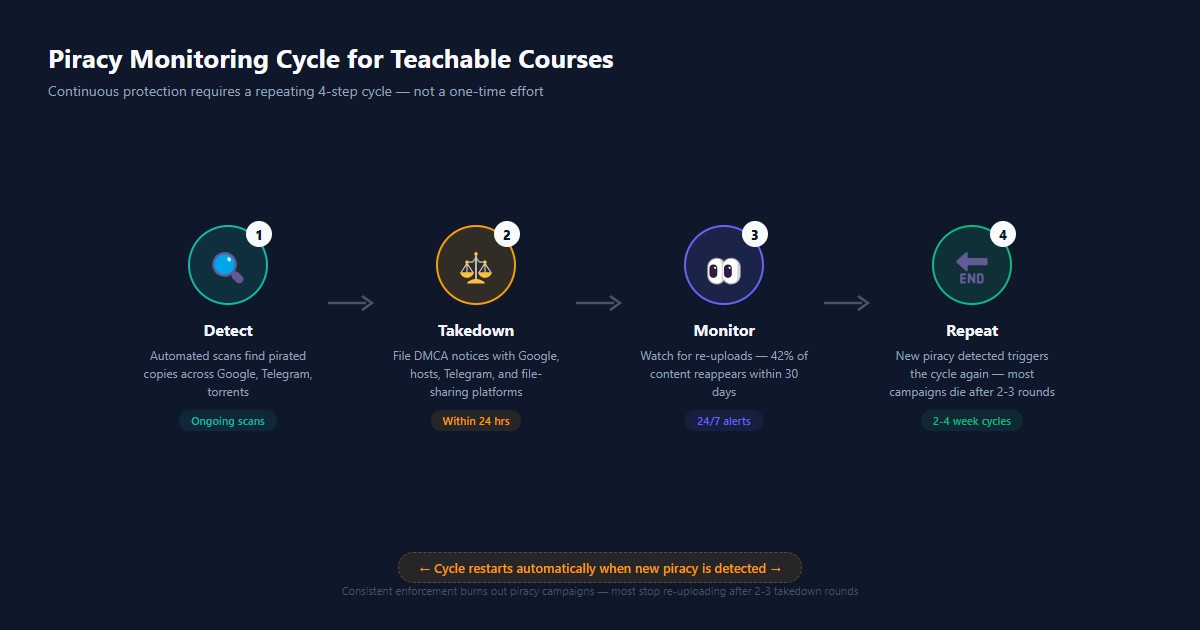
This is where most course creators fail. They find piracy, file takedowns, and consider the problem solved. In our monitoring data, 42% of removed pirated content reappears within 30 days under a new URL, often on the same Telegram channel or a mirror site.
Piracy is a recurring maintenance problem, not a one-time crisis.
Manual monitoring schedule (minimum):
- Weekly: Run Telegram search for your course title
- Monthly: Run Google dork check and torrent indexer search
- After every launch or major promo: Run full scan immediately (piracy spikes post-launch)
- After every DMCA takedown: Recheck the same sources 2-3 weeks later
Automated monitoring:
CoursePiracy's automated monitoring runs scans continuously across all sources and sends alerts when new pirated copies are detected. This eliminates the monthly manual search time (typically 2-4 hours per course) and catches sources — especially Telegram private groups — that manual search misses.
For high-value courses ($297+), the ROI calculation is straightforward: if automated monitoring prevents even one or two piracy-enabled sales losses per month, the tool pays for itself.
Teachable's Position vs. Other Platforms
How does Teachable compare to Kajabi and Thinkific on piracy risk?
| Platform | Video DRM | PDF Download Control | DMCA Cooperation | Overall Risk |
|---|---|---|---|---|
| Teachable | Basic (no download button) | Moderate | Standard | Medium-High |
| Kajabi | Basic | Moderate | Standard | Medium-High |
| Thinkific | Basic | Better | Standard | Medium |
| Podia | Basic | Moderate | Standard | Medium |
No mainstream course platform offers meaningful technical DRM comparable to what streaming services like Netflix use. The differences are marginal — the biggest variable is your course price (higher price = higher piracy incentive) and how aggressively you monitor and respond.
Teachable and Kajabi rank similarly in our piracy rate data because they serve similar creator audiences and price points. Thinkific trends slightly lower — possibly due to different community norms among its creator base, or because our scan data is weighted toward Teachable/Kajabi launches.
Frequently Asked Questions
Is my Teachable course at risk of piracy?
Yes — significantly so if your course is priced at $99 or above. In our scans, more than 60% of Teachable courses in that price range had at least one active pirated copy. The risk isn't theoretical. Teachable's popularity means it's where pirates look first when sourcing high-value course content for redistribution. Even if you've never noticed piracy yourself, it may already be happening — most creators only find out when someone sends them a link. Run a free scan to check your current exposure.
What's the best way to protect a Teachable course from piracy?
No single method is complete, but layered protection works. Start with detection: run a scan to find what's already leaked. Then enable the security settings available in your Teachable admin. When you find piracy, file DMCA takedowns promptly — don't wait. Then set up ongoing monitoring so you catch re-uploads before they accumulate traffic. The combination of detection + legal action + monitoring is significantly more effective than any single measure, especially for courses priced $200+.
Does Teachable prevent screen recording?
No. Teachable's video player is browser-based and provides no technical barrier to screen recording software operating at the OS level. Tools like OBS Studio can capture video output directly from the graphics card, bypassing any browser-level protection. This is an inherent limitation of all web-based course platforms — not specific to Teachable. The practical response is to accept that screen recording will happen and focus your energy on detection and takedown rather than trying to prevent it technically.
How fast can I get pirated copies of my Teachable course removed?
Response times vary substantially. Legitimate US-based hosting providers typically remove content within 24-72 hours of receiving a valid DMCA notice. Google search result removal takes 1-5 business days. Telegram is inconsistent: 3-7 days with proper reporting in some cases, no response in others. Offshore torrent trackers typically ignore DMCA notices — for those, focus on Google deindexing the indexer page rather than the tracker itself.
Can I find out who pirated my Teachable course?
Sometimes. If you issued unique coupon codes per affiliate or promotional channel, you can trace which code was used by the account that leaked the content. If you embed invisible watermarks (steganographic marks) in your video files, forensic analysis can identify the source. Without those identifiers, tracing back to a specific individual is very difficult. For most creators, the practical priority is removing existing piracy and monitoring for new copies rather than identification.
Is automated piracy monitoring worth it for small course creators?
It depends on your course price and sales volume. If your Teachable course sells at $197+ and you have ongoing sales, the math typically works in favor of automation. Manual monthly monitoring takes 2-4 hours and still misses Telegram private groups and some torrent sources. Automated tools like CoursePiracy scan continuously and alert you to new copies immediately. A single prevented piracy incident (one non-paying user redirected to purchasing) often covers the monitoring cost for months. For lower-priced courses with limited sales, manual quarterly checks may be sufficient.
Related Reading
- How to Find If Your Teachable Course Is Pirated — Step-by-step detection guide
- Teachable DMCA Takedown Guide — Templates and instructions for DMCA
- Course Piracy Statistics 2026 — Data on piracy rates by platform and price
- Kajabi Piracy Protection Guide — Compare with Kajabi protection approach
- Thinkific Piracy Protection Guide — Compare with Thinkific protection approach
- How Course Platforms Profit from Piracy — Why platforms don't protect your content
Written by
CoursePiracy Team
Digital content protection specialists helping course creators detect and take down pirated copies of their work.
Related Reading
Is Your Thinkific Course Being Pirated? Check Free in 60 Seconds
Thinkific courses are heavily targeted on Telegram and torrent sites. Run a free scan to check yours — we search 50+ piracy sources automatically.
March 8, 2026
Is Your Kajabi Course Being Pirated? Check Free in 60 Seconds
Kajabi's Cloudflare protection doesn't stop download-and-reshare piracy. Scan free across Telegram, torrents, and 50+ piracy sources instantly.
March 6, 2026
Gumroad Piracy Protection: Find & Remove Pirated Products [Free Scan]
Gumroad has zero built-in piracy protection. Check if your products are being shared on Telegram or torrent sites — free scan + DMCA takedown templates.
March 5, 2026
Harvel Reviews — What Reddit & Real Users Say [2026]
We analyzed every Harvel review on AppSumo, Reddit, and creator forums. The honest verdict on pricing, detection accuracy, and the blind spots nobody mentions.
March 5, 2026